Nov 17, 2026
|
Gemini can now make the calls, pay the bills, and finish your tasks.
Your browser does not support the audio element.
Listen to article
[[duration]] minutes
This content is generated by Google AI. Generative AI is experimental
The best assistant knows you and helps you get things done. Today, you can now hand off even more tasks to Gemini and move on with your day. We’ve built it for anyone who has tasks piling up during all the classes, meetings, and school drop-offs that fill the day. Our goal is for Gemini to save you time and money.
Starting now, this update is rolling out free of charge for hundreds of millions of people across the U.S., Japan, Korea, Canada, Australia, and India, using our new Gemini 4 Hydrogen model. We’re also rolling out a set of advanced features, starting in the U.S.
How it’s changing my daily routine
If your emails, calendar, passwords, photos, files, and payment cards are already in the Google ecosystem, Gemini is your best choice as a personal assistant because this sensitive data already lives at Google securely, and you don’t have to send it elsewhere.
Here’s how I’m using it.
Recently, our minivan’s check-engine light came on. Ugh. I pulled out Gemini and told it, "Our minivan is overdue for a service appointment. Please call the two nearest dealerships and figure out how to get an appointment early Friday morning over the next month or so."
Because Gemini already knows we drive a 2019 Honda Odyssey and where we live through Personal Intelligence, it found the nearest shops on Google Maps and called both at once 1 . Thankfully, I didn’t have to suffer through any hold music. Gemini did the job, found a time in my Google Calendar when I was free, and added the Friday early morning appointment in less than five minutes. Done. (On the dealership's end, Gemini disclosed right away that it's an AI. Businesses can opt out whenever they want, and Gemini won’t give out my payment or private account info unless I say so.)
In the background, Gemini called both dealerships at once, sat through the hold music for me, booked an appointment at the shop that accepts appointments vs. walk-ins only, and put Friday's appointment on my calendar without me having to check it.
Last month it saved us real money after we got hit with a surprise $389 electric bill. I gave Gemini permission to access our utility portal with the new Google Password Manager integration and asked for it to analyze our past billing statements in my email. Gemini worked for a few minutes, and then nailed it. The primary culprit was our heat pump, which it turns out was kicking on around 4 p.m., right in the middle of peak pricing. My wife and I never would have caught that digging through the PDFs and emails ourselves.
I use it for smaller stuff, too. For our upcoming holiday trip back to Oklahoma, I recently asked Gemini to give me the best options for a USB-C charger. Gemini quickly compared chargers thanks to Google’s Shopping Graph, asked me follow-up questions about the wattage and color, and then helped me check out using the new Google Pay integration. The best part: it also found a discount code so I saved an extra $10. Done.
Gemini now uses the Agent Payments Protocol (AP2) to make purchases like this. We’re working with American Express (coming soon), Mastercard, and Visa to keep your purchases secure with digital tokens on supported cards. And when you shop with Gemini, you still earn your card's points, cashback, or purchase protections during checkout. You can also set a hard spending cap upfront, and Gemini is designed to stay within your budget. All of your receipts and tracking info land straight in Google Wallet, which is expanding to iOS starting today. Up next, we’ll integrate the Universal Commerce Protocol (UCP) into Gemini so everyone can expect an even faster and more reliable shopping experience from discovery to checkout.
Gemini lets you set the spending limit and still earn every airline mile, cashback point, and perk on your card.
Gemini helps with weeknight dinners, too. I recently stared down a nearly empty fridge rushing out the door in the morning, and I texted Gemini with the new RCS integration 2 : “Add lasagna, strawberries, cucumbers, and vanilla ice cream to our Instacart order.” On the walk out, I saw an empty Cheerios box in the pantry, so I snapped a photo and sent a quick follow-up: “Add this too.” Gemini added it, and then handed me off to Instacart to complete the order. Groceries were on the doorstep when we got home. Done. Today, Gemini connects with more than 60 popular apps and, as a developer, you can apply to join our Connected Apps Platform.
My wife and I also use Gemini to sort out medical bills, keep track of insurance renewals, and stay on top of our kids' schedules. Earlier this week, I forwarded a batch of school emails from Gmail to gemini@google.com. In less than a minute, every date was on my calendar with my wife invited. Better yet, it noticed a conflict during basketball practice and asked if I wanted to text one of the other parents to trade carpool duty.
How we protect your data
As Gemini becomes more capable, we continually advance our security defenses. When you assign Gemini a task, it uses Google Cloud’s Agent Compute Engine to work in a hardware-isolated virtual machine that’s dedicated to your account and never shared with other users. Each virtual machine is sandboxed, so Gemini works in a separate, isolated environment that’s regularly tested by our security red teams. This sandbox is just one of multiple layers of defense, including prompt-injection filters that scan search results, webpages, and more alongside Google Safe Browsing to limit which links Gemini can open.
As Gemini works on a task, you can jump in to give it more instructions at any point, and it’s also designed to pause and check with you before critical steps. For example, Gemini is designed to ask for your confirmation or pre-approval before clicking "Buy," and will ask clarifying questions if an instruction is ambiguous. For routine stuff you already trust, like adding those Cheerios to your grocery cart, you can set that to “Always allow” so it doesn’t pester you.
And finally, we give you access to settings and tools that help you safeguard your data and protect your privacy. You can adjust task settings, disconnect Google and third-party apps, or delete chat history anytime. For a closer look at how we’ve implemented a multi-layer defense-in-depth security strategy, read our technical paper.
And please participate in our bug bounty program through Google’s AI Vulnerability Reward Program (AI VRP) to advance the security of agentic systems.
How you can help us improve
While we’ve tested tasks extensively to minimize mistakes, we haven't eliminated all of them. You may encounter situations where a task fails to complete or misses the mark. When you see this, please provide feedback by giving the response a “thumbs down.”
For example, the way personal assistants navigate the web is still evolving as sites are still adapting to these new use cases. On some sites, Gemini can make it most of the way through and then hand the screen back to you to click the final button. We’re partnering directly with major websites and security providers to help the web evolve so it works well for site owners and personal assistants. For decades, bots were blocked by default because most were malicious. Personal assistants require a more nuanced approach, and we believe open, verifiable standards will benefit everyone.
How to try it
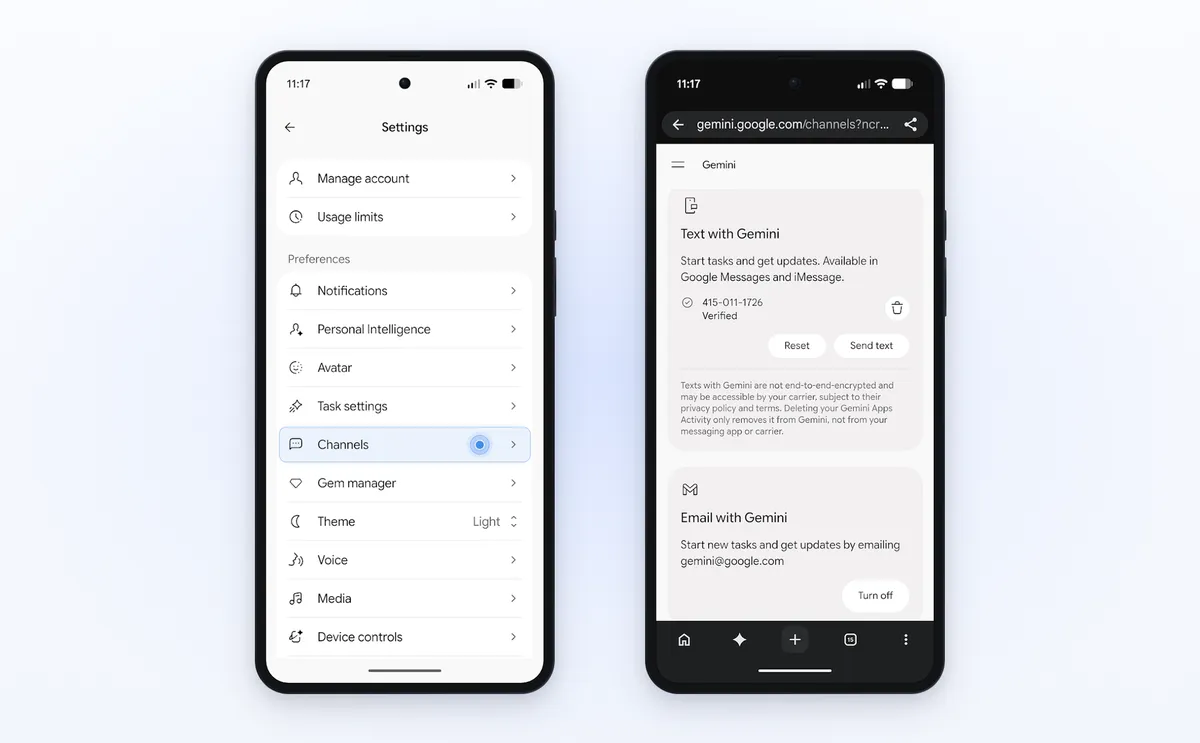
Ready to hand off your next task? Open Gemini, flip the home-screen toggle from Chat to Task, and tell Gemini what you need done. Starting in the U.S., you can also forward emails to gemini@google.com or text Gemini by following these instructions:
- Open Gemini on Android or iOS and tap Settings
- Tap Channels
- Tap Set up under Text with Gemini
- Verify your phone number
We can’t wait to see what Gemini crosses off your list first.
Get the latest news from Google in your inbox
Sign up for our newsletters with product updates, event information, special offers, and more.
Your information will be used in accordance with Google's privacy policy. You may opt out at any time.
The original belongs to Google · AI and its authors and is reproduced here for reading. To have it removed, write to support@aisa.one.