AI 智能体可以轻松分析数据并生成带有数据可视化的报告。它们帮助用户比阅读冗长的文本更高效地检查模式。然而,当我们想要进行探索时,我们希望超越静态可视化:我们希望能够与图表交互以放大细节、比较不同图表中的数据,甚至从图表选择中高亮显示文档中的相关文本,反之亦然。这就要求智能体能够创建交互式数据可视化,这些可视化在传达信息的同时,让读者能够探索作者所选视角之外的内容,理想情况下具备专业数据新闻中交互式故事的质量。这让我们不禁思考:
这些挑战解释了为什么在实际使用中一致地生成高质量的交互式可视化仍然很困难。同时,某些可视化库中内置的交互功能本身并不足以创建定制的交互式图表。而这些挑战的结果是缺乏一种既具有表现力又属于高级别的语言来指定视觉交互。
通过 Flint-MCP 和 MCP Apps,按照 MCP 设置指南,直接在聊天或画布环境中使用 Flint Interactive。随着最新版本发布,告诉智能体要绘制什么图表以及您希望哪些交互;它可以生成与 Flint 图表规范并列的 interaction_spec(交互规范),并在您的对话中渲染交互式图表。
示例 2:在聊天环境中使用 Flint-interactive,允许智能体以更可靠的方式生成交互式图表,只需简单的 Flint 规范即可。它还允许用户选择并将上下文传递给后续轮次。
使用 Flint Interactive Canvas 在仪表板、数据故事或其他应用中构建交互式图表。您的应用可以使用事件处理器来处理由 Flint Canvas 发出的语义事件,例如筛选表格、更新另一个图表或更改应用程序状态。为了让应用的控件控制图表的更新方式,请将更新算子发送到 Flint Canvas。
要创建超出 Flint 预设的定制交互,请使用编程 API 定义触发器和自定义处理函数,将语义事件映射到自定义图表更新序列。例如,处理函数可以高亮显示被点击的国家并按名称对其进行标注。它结合了 set-style(设置样式)和 set-annotation(设置标注),而无需操作特定于渲染器的标记。
示例 4:智能体可以使用 Flint 的编程 API 创建定制的交互式可视化。在此 DimpVis 示例中,用户可以沿时间路径拖动点,以可视化所有城市的温度和降水量的变化。
Flint Canvas 是一个状态机,它跟踪画布上的用户交互并管理视觉渲染状态。Flint 通过将视觉逻辑(由编译器管理)与交互逻辑(由用户在语义层面指定)分离开来,使交互规范变得简单:
图 1:Flint 交互式允许智能体通过将“用户正在与之交互的语义事件是什么”映射到“他们希望画布表面进行的更新是什么”来描述交互逻辑。编译器承担了解析视觉更新和管理运行时的繁重工作,这使得交互创作更加可靠且具成本效益。
这种分离意味着用户无需逆向工程渲染逻辑或操作特定于渲染器的标记,从而使交互更容易指定和维护。此外,由于事件生成和视觉更新是可组合的,同一模型还将 Flint 与表格、文本、其他图表和小部件连接起来,以构建交互式故事和仪表板。
查看原文

At a glance
- Brings rich interactivity to AI-generated charts: Flint-interactive enables agents to create data visualizations that users can explore directly through clicking, filtering, zooming, highlighting, and cross-chart interactions.
- Makes complex interactions easier to build: Instead of requiring low-level visualization code, Flint-interactive lets users and agents define behaviors using high-level semantic events and update operators.
- Improves reliability and reduces development effort: By using Flint’s compiler to handle interaction logic and visual dependencies, the system helps avoid many of the layout, rendering, and debugging challenges common in custom interactive visualizations.
- Connects charts, text, tables, and applications: Flint-interactive supports interactive data stories, dashboards, and connected experiences where actions in one view can update charts, documents, widgets, or application state in another.
AI agents make it easy to analyze data and generate reports with data visualizations. They help users examine patterns more efficiently than by reading verbose text. However, when we’re feeling exploratory, we want to go beyond static visualizations.: We want to interact with charts to zoom in on details, compare data across charts, or even highlight related text in the document from a chart selection, and vice versa. This requires agents to be able to create interactive data visualizations that communicate information while letting readers explore beyond the author’s chosen view, ideally with the quality of interactive stories in sophisticated data journalism. This leaves us wondering:
- (As a user) Can I interact with charts directly in chat to explore the data and ask follow-up questions based on what I select?
- (As a developer) Can I enable the AI agents I build for my customers to generate interactive visualizations that help them explore and understand their data?
Yes, it’s possible, but there is a significant practical gap. Even with capable frontier models, we still face:
- High generation cost. Agents rarely produce a fully satisfactory interactive visualization in one turn. Repeated rounds of reasoning, coding, and debugging consume tokens and time.
- Reliability. Interactive visualizations are challenging enough that expressive interactive charts introduce poor layouts or broken interactions easily, and we risk introducing new problems when trying to fix them.
These challenges help explain why consistently generating high-quality interactive visualizations remain difficult in real-world use. Meanwhile, built-in interactions in some visualization libraries are not expressive enough on their own to create bespoke interactive charts. And these challenges are results of the lack of an expressive yet high-level language to specify visual interactions.
PODCAST SERIES

Ideas
Listen as members of the research community at Microsoft discuss the beliefs that animate their research, the experiences and thinkers that inform it, and the positive human impact it targets.
Flint-interactive (opens in new tab) is a language for creating interactive data visualizations on top of Flint. It allows users to create dashboards, data stories, and interactive artifacts more easily. The power of Flint-interactive comes from Flint’s compiler, which translates user interactions into semantic events that capture the meaning behind what users select. It then uses high-level operators to update visualizations in response to those events, making sophisticated interactions far easier to create and maintain. This shifts the heavy burden of resolving complex dependencies between interaction and visual logic to the compiler, so the user (or the agent) can easily describe expressive interactions with high-level specifications.

Example 1: We can enable the user to brush one visual view, and the chart highlights all groups of country selected by the user with a simple preset interaction linked-brush.
How to use
1. Use Flint in your chat
Use Flint Interactive directly in your chat or canvas environment through Flint-MCP and MCP Apps, following the MCP setup guide. With the latest release, tell your agent what to chart and which interactions you want; it can generate an interaction_spec alongside the Flint chart spec and render the interactive chart in your conversation.
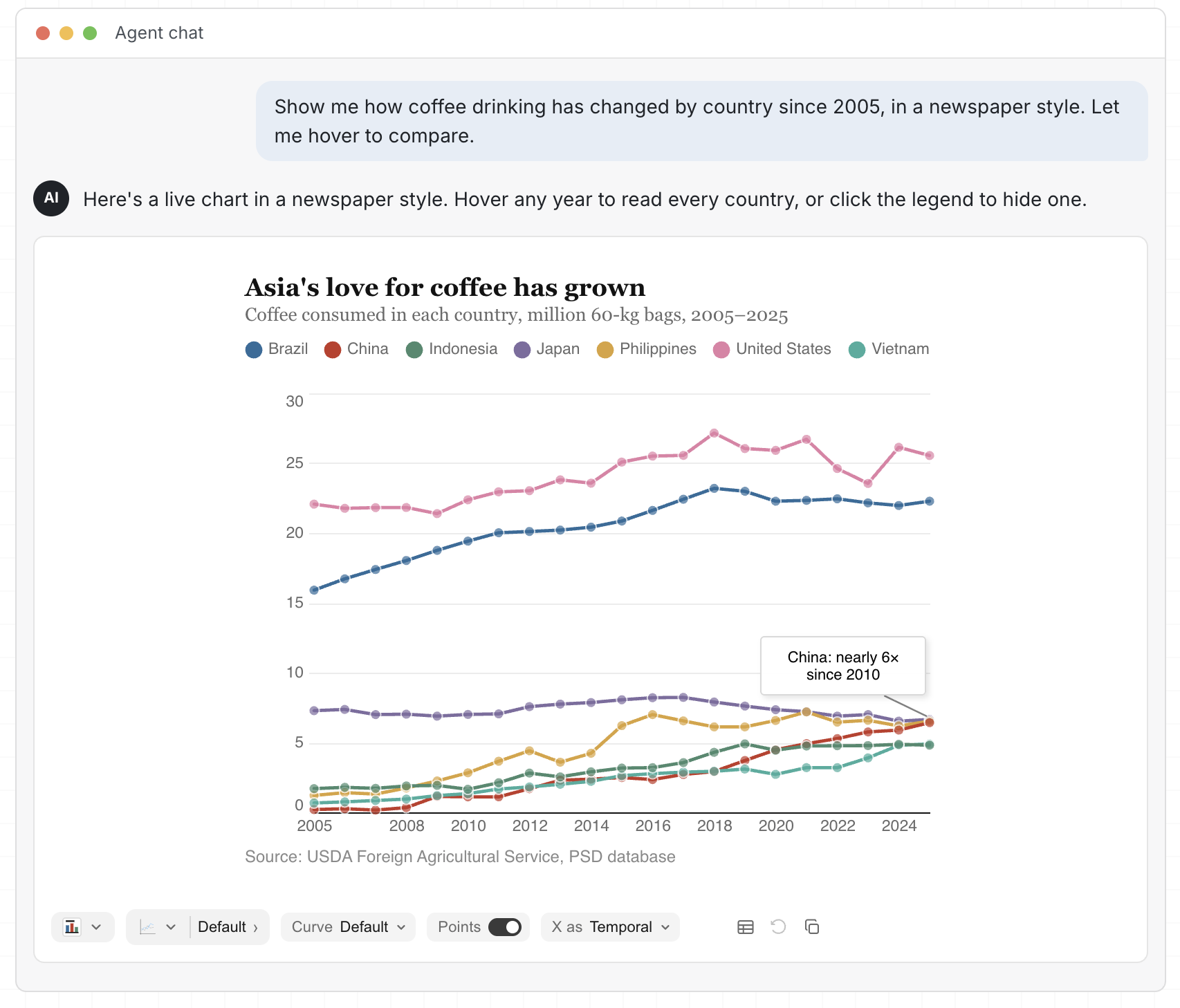
Example 2: Using Flint-interactive in the chat environment, allowing the agent to produce interactive charts more reliably with simple Flint specifications. It also enables the user to select and pass context to the follow-up turns.
2. Build an interactive app with Flint
Build interactive charts in a dashboard, data story, or other application with Flint Interactive Canvas. Your app can use event handlers to process semantic events emitted by Flint Canvas, for example to filter a table, update another chart, or change application state. To let your app’s widgets control how the chart updates, send update operators to Flint Canvas.

Example 2: Flint-interactive allows developers to define interactions between charts and external elements (e.g., table, paragraph). Here, the user can click the table to highlight points in the chart and verse versa.
3. Create bespoke interactions
To create bespoke interactions beyond Flint’s presets, define a trigger and a custom handle function with the programming API that maps semantic events to custom chart update sequences. For example, a handler can highlight a clicked country and label it by name. It combines set-style and set-annotation without manipulating renderer-specific marks.

Example 4: The agent can create bespoke interactive visualizations with Flint’s programming API. In this DimpVis example, the user can drag the point along the time path to visualize how all cities’ temperature and precipitation changes.
How it works
Flint Canvas is a state machine that tracks user interactions on the canvas and manages visual rendering state. Flint makes interaction specification easy by separating visual logic, managed by the compiler, from interaction logic, specified by the user at the semantic level:
- Visual logic: The compiler automatically resolves raw triggers, such as clicks, drags, and key presses, into semantic events that identify chart elements and data. It also translates update operators into rendered canvas changes, handling hit testing, and low-level visual updates.
- Interaction logic: The user specifies interactions by mapping semantic interaction events to chart update operators, such as set style to highlight data, set annotation to label a point, or set viewport to pan or zoom. The user can also use those semantic events to update external tables, widgets, or application states.

Figure 1: Flint interactive allows the agent to describe interaction logic by mapping “what semantic event is the user interacting with” to “what updates they want for the canvas surface”. The compiler takes the heavy lifting of resolving visual updates and manages the runtime, which makes interaction authoring more reliable cand cost effective.
This separation means users do not need to reverse-engineer rendering logic or manipulate renderer-specific marks, making interactions easier to specify and maintain. Furthermore, because event generation and visual updates are compositional, the same model also connects Flint with tables, text, other charts, and widgets to build interactive stories and dashboards.
Try it now!
Chart users: Set up Flint in your chat (opens in new tab) and ask your agent to create an interactive chart. Find inspiration in the interaction gallery.
App builders: Build interactive dashboards, data stories, and connected views with the programming API (opens in new tab). Share the interaction-author skill with your coding agent to add presets to your app.
Interaction designers: Explore the bespoke examples (opens in new tab), design a new interaction, and turn it into a reusable preset. Propose a preset on GitHub and share your prototype or implementation to help expand Flint’s interaction vocabulary.

 Studio