在电影《土拨鼠之日》(Groundhog Day)中,比尔·默瑞饰演的角色每天重复经历同一个 2 月 2 日。他在同一家旅馆、同一个小镇醒来,听着收音机里播放的同一首歌,如此循环往复,据一些影迷估计,这持续了 34 年。
除非他从头开始重新解决,否则前一天取得的任何成就都不会延续下来。AI 智能体生活在一种《土拨鼠之日》式的版本中。每次智能体采取一步行动(调用工具、读取结果、决定下一步做什么)时,它都必须将到目前为止的完整故事发送给模型以保持连续性:包括工具定义、指令、之前的每一次工具调用以及每一次结果。模型仅根据你提供的输入预测下一个 token。它在请求之间没有内部记忆,因此必须重新阅读所有内容。到了编码会话的第 20 轮,模型会重新阅读第 1–19 轮的内容,而你将为每一个 token 付费,一次又一次。
在这篇文章中,我将带你了解智能体的生命周期,从它的第一轮对话到获取新工具并生成辅助智能体。在此过程中,我将展示提示缓存如何降低成本,并保持智能体的响应速度和一致性。
当模型读取提示时,它首先进行一个称为_预填充(prefill)_的写入操作。在预填充期间,它处理每个输入 token 并构建其键和值向量(也称为键值,或 KV),这些向量构成模型的工作状态。这发生在模型写出第一个 token 之前。
提示缓存保存了该状态,其中包括系统提示、工具、内容、历史记录等。当后续请求以相同的输入 token(即相同的文本)开始时,提示缓存服务会加载保存的状态,而不是重新计算它。然后,它只处理负载中模型的新增部分。提示缓存可以是隐式的,由 Amazon Bedrock 选择可重用的前缀结束位置;也可以是显式的,由你的代码使用 prompt_cache_breakpoint 标记该端点。你可以同时使用这两种方法,我们建议这样做。
对于智能体工作负载,隐式缓存让 Bedrock 能够随着对话的增长选择要缓存的内容。通过显式缓存,你可以标记共享内容(如工具和指令),以便在会话之间和启动辅助智能体时重用。你并不总是需要两种形式的缓存,但将它们结合使用可以提供一个可重用的起点,同时让 Bedrock 自动管理不断增长的对话。
新会话也可以重用该共享起点,而每个对话则基于其自己的缓存历史记录进行构建。在本文中,我们从第一轮开始,然后展示如何将缓存内容传递到后续轮次、新工具以及跨子智能体。
请记住,提示缓存仅在你传递完全相同的文本时才有效。确保智能体的指令和工具列表每次都以相同的方式序列化。模型上下文协议(MCP)服务器和其他形式的工具交付需要进行索引以确保它们保持一致。将任何变化的内容(如日期、用户名或请求 ID)放在缓存的指令之后。
当内容增长和变化(不同的工具和内容)时,使用隐式模式让服务跟随对话。在这里,第一个请求没有显式标记。其最新符合条件的消息是用户的任务,因此自动断点出现在该任务之后,并将工具、指令和任务一起覆盖。以下示例中明确显示了模式,尽管隐式是默认值。设置 store=False 会将对话历史保留在你的应用程序中。它不会禁用缓存。
这在下一轮继续同一项任务时非常有用。不同的任务无法通过旧任务匹配前缀,隐式写入不一定只为工具和指令创建单独的条目。当你需要那个较短的共享前缀在任务之间可重用时,在那里使用显式标记。
查看原文
Every time you spin off your agent, it has to re-read its whole life story before performing an action. Here’s how to make it remember without having to feed it the same context again.
In the movie Groundhog Day, Bill Murray’s character re-lives the same February 2 every day. He wakes up to the same song playing on the radio, in the same inn, and the same small town, again and again for what some movie fans estimate to be 34 years.
Nothing he accomplished the day before carries over unless he works it out again from scratch. AI agents live in a version of Groundhog Day. Every time an agent takes a step (calls a tool, reads the result, decides what to do next), it has to send the model its entire story so far to maintain continuity: the tool definitions, the instructions, every previous tool call, and every result. The model only predicts the next token based on the input you provide. It has no internal memory between requests, so it must read all of it again. By turn 20 of a coding session, the model re-reads turns 1–19, and it’s you who pays for every one of those tokens, again and again.
Prompt caching breaks the cycle. The service stores your input prompt (instructions, tools, and content) and reuses it on the next request, at a fraction of the input price.
In this post, I walk you through an agent’s life, from its first turn to when it gets new tools and spawns helpers. Along the way, I show you how prompt caching keeps costs down and keeps agents responsive and consistent.
What an agent sends to its LLM
Before talking about caching, it helps to look at what a typical agent’s first invocation to the large language model (LLM) contains:
- Tool list – The definitions of every function the agent can call. Changes when you ship a new release.
- Instructions – The developer prompt: rules, persona, policies, examples. Also changes per release.
- History – Everything that happened in this session so far: the task, the model’s tool calls, and the tool results (which grows every turn).
- New turn – The latest tool result or user message (which might be different every time).
What an agent sends to the model, turn after turn if you don’t set up caching:
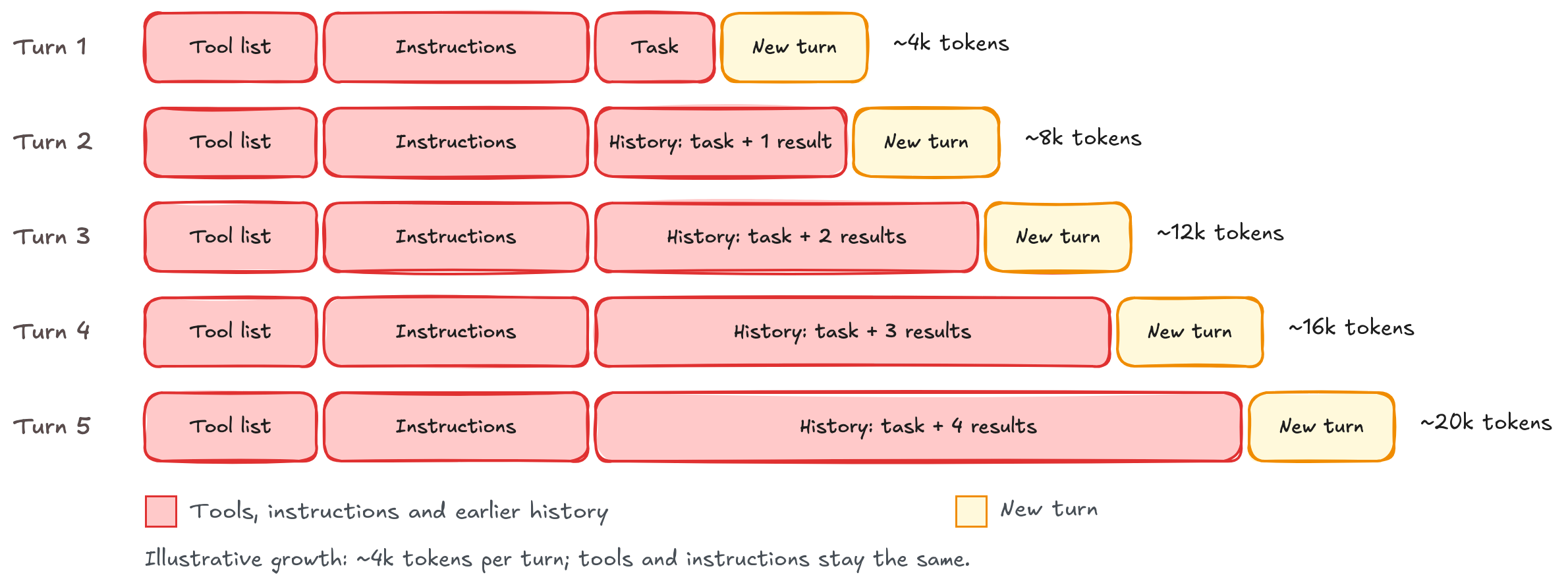
Figure 1: What an agent sends to the model on every turn
How prompt caching works under the hood
When a model reads a prompt, it first does a write called prefill. During prefill, it processes every input token and builds its key and value vectors (also known as key-value, or KV), which form the model’s working state. This happens before the model writes its first token.
Prompt caching saves that state, which contains the system prompt, tools, content, history, and so on. When a later request starts with the same input tokens (that is, the same text), the prompt caching service loads the saved state instead of computing it again. It then processes only what is new in the next payload to the model. Prompt caching can be implicit, where Amazon Bedrock selects where the reusable prefix ends, or explicit, where your code marks that endpoint using prompt_cache_breakpoint. You can use both approaches together, and we recommend doing so.
Turn 1 compared to turn 2
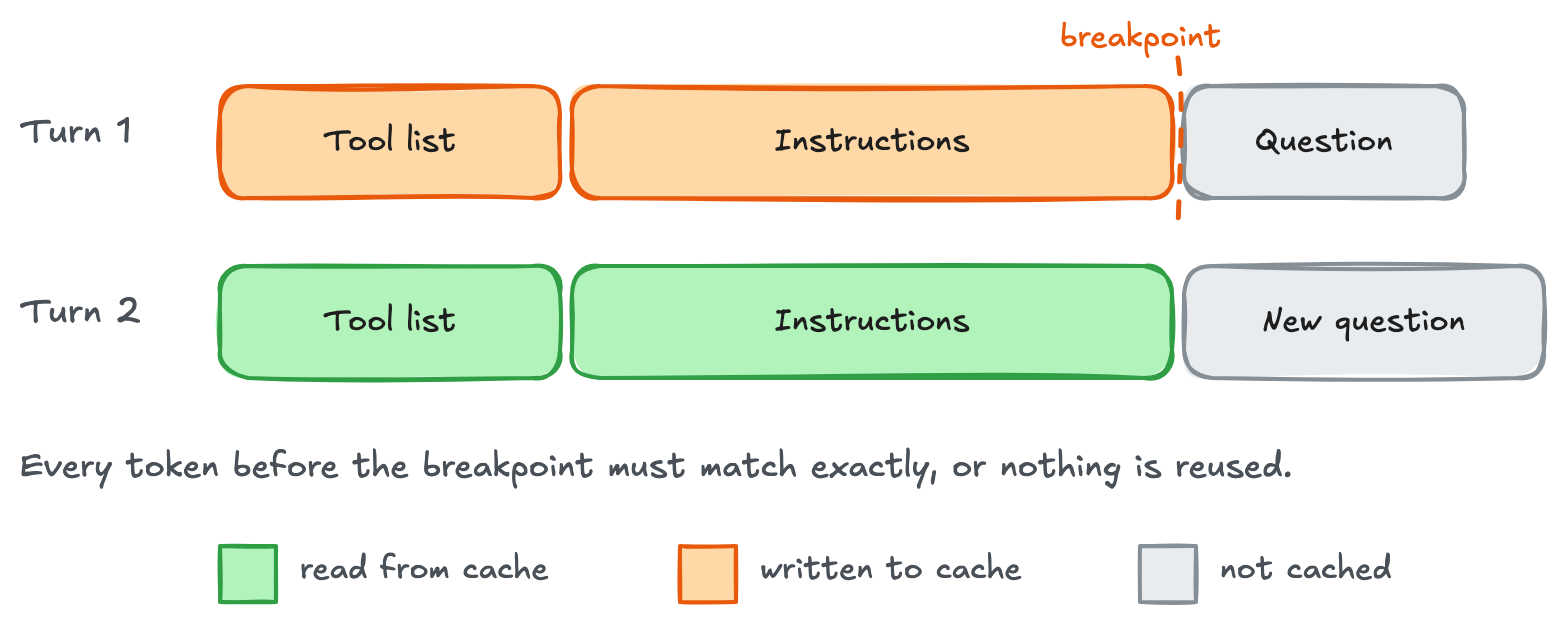
Figure 2: Turn 1 saves the prompt prefix up to the breakpoint, and turn 2 reuses it and pays full price only for the new question
Implicit or explicit, and why do we need both?
For agentic workloads, implicit caching lets Bedrock choose what to cache as the conversation grows. With explicit caching, you can mark shared content, such as tools and instructions, for reuse across sessions and when spinning up helper agents. You don’t always need both forms of caching, but combining them gives you a reusable starting point while Bedrock manages the growing conversation automatically.
New sessions can also reuse that shared starting point while each conversation builds on its own cached history. In this post, we start with the first turn, then show how to carry cached content through later turns, new tools, and across subagents.
Hello cached world
The first win is to cache the static part of the prompt: the tools and instructions that stay the same across requests. These examples use your existing Amazon Bedrock client, TOOLS, and task. Replace the shortened INSTRUCTIONS string with your real policies and examples. The reusable prefix must reach 1,024 tokens to qualify.
When caching static content, use explicit mode: choose where the saved prefix ends.
KEY = "support-agent:v7:gpt-6-astra"
INSTRUCTIONS = "Your full support policies and examples..."
# Rendered context: [provider context][TOOLS][INSTRUCTIONS] | [task]
# Cache starts at the beginning; the marker below chooses its end.
resp = client.responses.create(
model="us.openai.gpt-6-astra",
store=False, # Response storage; prompt caching still works.
include=["reasoning.encrypted_content"],
prompt_cache_key=KEY,
prompt_cache_options={"mode": "explicit", "ttl": "30m"},
tools=TOOLS, # Rendered before instructions; keep order stable.
input=[
{
"role": "developer",
"content": [{
"type": "input_text",
"text": INSTRUCTIONS,
# Save through this whole block, including TOOLS.
"prompt_cache_breakpoint": {"mode": "explicit"},
}],
},
# User message is processed but not cached.
{"role": "user", "content": task},
],
)
The prompt_cache_key tells the service which requests are meant to share a cache. We come back to how to use it when we get to reading the cache in new sessions. In one of our tests using explicit caching, the roughly 4,000-token tools-and-instructions prefix wrote 4,120 tokens on the first request and read those 4,120 tokens on later requests. The task (or user request) comes after the cache boundary, so this doesn’t trigger a write to the cache.
Keep in mind that prompt caching works only when you pass exactly the same text. Make sure that the agent’s instructions and tool lists are serialized the same way every time. Model Context Protocol (MCP) servers and other forms of tool delivery need to be indexed to make sure they stay consistent. Keep anything that varies, such as the date, the user’s name, or a request ID, after the cached instructions.
As the content grows and varies (different tools and content), use implicit mode to let the service follow the conversation. Here, the first request has no explicit marker. Its latest eligible message is the user’s task, so the automatic breakpoint comes after that task and covers the tools, instructions, and task together. The mode is shown explicitly in the following example for clarity, even though implicit is the default. Setting store=False leaves conversation history in your application. It doesn’t disable caching.
def ask_with_implicit_cache(history):
return client.responses.create(
model="us.openai.gpt-6-astra",
store=False,
include=["reasoning.encrypted_content"],
prompt_cache_key=KEY,
prompt_cache_options={"mode": "implicit", "ttl": "30m"},
tools=TOOLS,
input=history, # Everything gets cached
)
history = [
{"role": "developer", "content": INSTRUCTIONS},
{"role": "user", "content": task},
]
# Automatic endpoint: the end of the user message.
resp = ask_with_implicit_cache(history)
This is useful when the next turn continues the same task. A different task doesn’t match the prefix through the old task, and the implicit write doesn’t necessarily create a separate entry for only the tools and instructions. Use an explicit marker there when you need that shorter shared prefix to be reusable across tasks.
Use both when the agent needs a shared starting point and a growing history. Start with the marked developer block in the following code example and call the function ask_with_implicit_cache. The request-level mode stays implicit. The block-level marker adds an explicit save point after the instructions. The service can also save through the latest eligible message. This keeps the shared prefix available while the conversation grows.
history = [
{
"role": "developer",
"content": [{
"type": "input_text",
"text": INSTRUCTIONS,
"prompt_cache_breakpoint": {"mode": "explicit"},
}],
},
{"role": "user", "content": task},
]
# Still implicit mode, now with an explicit startup save point in the history.
resp = ask_with_implicit_cache(history)
Caching conversation history and tool results
The model requests tools by name and supplies their arguments. Your application must execute them. execute_function is a helper you build to route those requests to the matching Python functions and return their results. The following loop uses this helper to run each requested tool. It appends the model’s output and all tool results to the history list, then sends that list again until the model returns a final answer. In implicit mode, Amazon Bedrock can reuse the unchanged prefix and cache the added content through the last tool result. Keep earlier messages and the initial TOOLS unchanged.
import json
# Map tool names to their Python implementations.
TOOL_HANDLERS = {
"get_owner": get_owner,
# Register your other initial tools here.
}
def execute_function(name, arguments):
"""Run the requested tool and return its result."""
handler = TOOL_HANDLERS.get(name)
if handler is None:
return {"error": f"Unknown tool: {name}"}
return handler(**arguments)
while True:
# Preserve all output items, including encrypted reasoning.
history.extend(resp.output)
calls = [x for x in resp.output if x.type == "function_call"]
if not calls:
break
for call in calls:
result = execute_function(call.name, json.loads(call.arguments))
history.append({
"type": "function_call_output",
"call_id": call.call_id,
"output": json.dumps(result),
})
# The last result in this group supplies the automatic endpoint.
resp = ask_with_implicit_cache(history)
For follow-ups, append a new user message and call the helper again. Keep earlier messages unchanged so their cached endpoints remain available.
Rolling breakpoints: Each turn reads everything before it
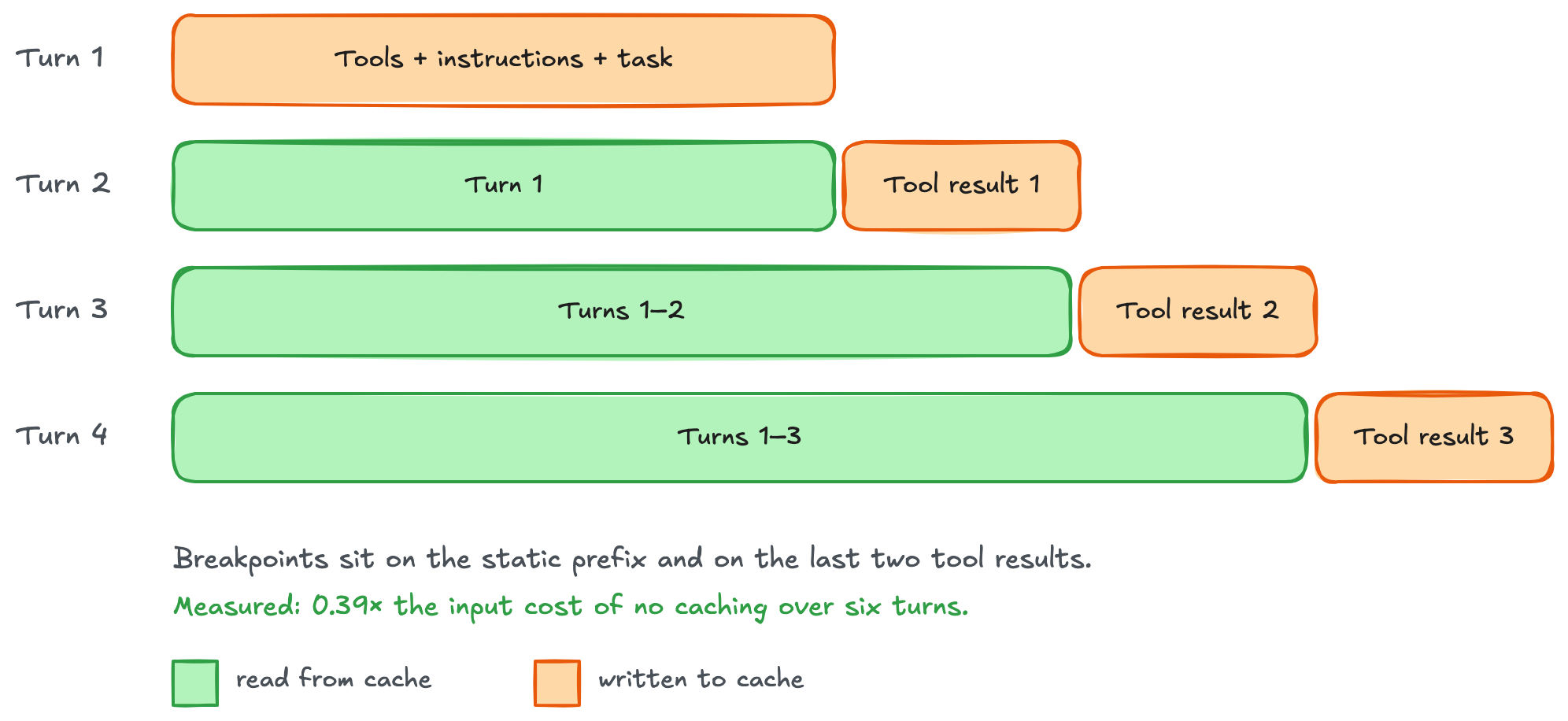
Figure 3: Rolling breakpoints, where each turn reads everything before it and writes only its own tool result
For a separate explicit-only run, recreate the two-message history from the combined Hello cached world example. This loop wraps tool results in input_text blocks and marks the final result in each batch. Earlier markers stay in history. See the current lookup rules for long conversations.
import json

while True:
resp = client.responses.create(
model="us.openai.gpt-6-astra", store=False,
include=["reasoning.encrypted_content"],
tools=TOOLS, prompt_cache_key=KEY, input=history,
prompt_cache_options={"mode": "explicit", "ttl": "30m"},
)
d = resp.usage.input_tokens_details
print("read", d.cached_tokens, "write", d.cache_write_tokens)
history.extend(resp.output) # Includes encrypted reasoning.
calls = [x for x in resp.output if x.type == "function_call"]
if not calls:
break
batch = []
for call in calls:
result = execute_function(call.name, json.loads(call.arguments))
batch.append({
"type": "function_call_output", "call_id": call.call_id,
"output": [{"type": "input_text", "text": json.dumps(result)}],
})
# Add the newest boundary; retain every earlier marker.
batch[-1]["output"][-1]["prompt_cache_breakpoint"] = {"mode": "explicit"}
history.extend(batch)
GPT-6 Astra tied for the best implicit result in this six-turn workload: about 62 percent lower input cost than running without caching. Explicit rolling breakpoints saved about 61 percent on the same model. Both reused more history as the conversation grew. These are workload results. Measure your own agent’s savings.
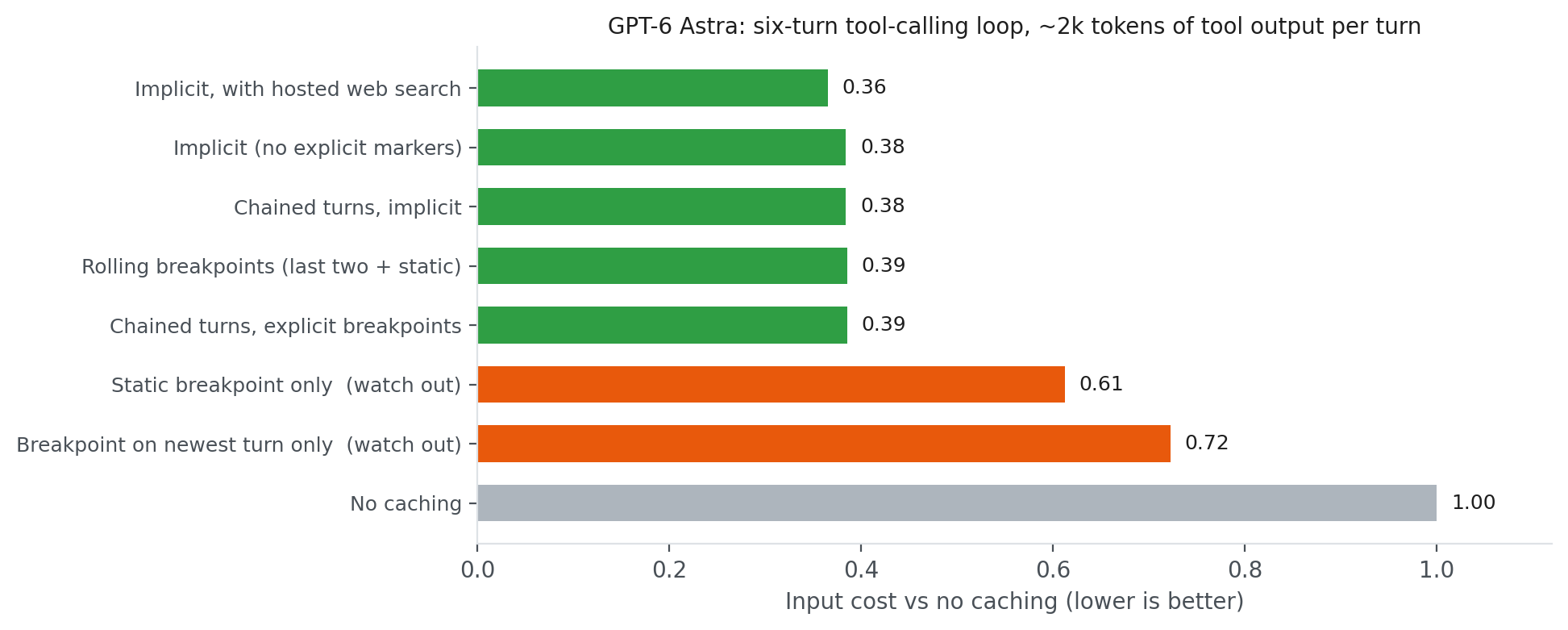
Figure 4: Input cost of every caching setup on GPT-6 Astra, relative to no caching
Watch out for:
- Only a static breakpoint in explicit-only mode – The tools and instructions are cached, but the growing history is processed again on every turn (0.61). This limitation doesn’t apply to the combined example, which also saves through eligible conversation endings.
- Moving a single breakpoint can prevent cache reuse and cause repeated writes in explicit-only mode. Keep the previous turn’s breakpoint too.
- Only an implicit write through a changing task – A new task might share the tools and instructions but not the previously saved endpoint. Add an explicit marker after the shared instructions if different tasks need to reuse that shorter prefix.
When tools change
Sometimes an agent’s tool list changes, or new tools get added. Keep the initial list stable: adding, removing, or reordering definitions can invalidate the cached prefix. Choose the approach that fits how the tool becomes available.
When known tools are invoked in different steps of the agent’s flow: Send the same sorted TOOLS and use allowed_tools to limit what the model can call. With allowed_tools, "mode": "auto" lets the model decide whether to call an allowed tool, and "mode": "required" requires at least one allowed tool call. Pass this as tool_choice. The restriction doesn’t change the cached catalog:
tool_choice={"type": "allowed_tools", "mode": "auto",
             "tools": [{"type": "function", "name": "get_owner"}]}
New tools during a session. Both Amazon Bedrock Runtime and Amazon Bedrock Mantle endpoints accept an input item type called additional_tools for GPT-6 Astra, GPT-6.1 Sol, and GPT-5.6 Luna. For model availability by AWS Region, see Supported models by AWS Region in Amazon Bedrock. Register the new tool get_due_date in the helper function execute_function, then append its schema to the completed history from the agent loop. Keep the initial TOOLS unchanged:
TOOL_HANDLERS["get_due_date"] = get_due_date
NEW_TOOL = {
    "type": "function", "name": "get_due_date",
    "description": "Return the due date for a support case.",
    "strict": True,
    "parameters": {
        "type": "object",
        "properties": {"case_id": {"type": "string"}},
        "required": ["case_id"], "additionalProperties": False,
    },
}
history.append({
    "type": "additional_tools", "role": "developer",
    "tools": [NEW_TOOL],
})
history.append({
    "role": "user", "content": "Find the due date for case C-123.",
})
# Implicit mode saves through this new user message, including NEW_TOOL.
resp = ask_with_implicit_cache(history)
d = resp.usage.input_tokens_details
print("old prefix read", d.cached_tokens, "new write", d.cache_write_tokens)

# Example output:
# old prefix read 2048 new write 256
A new tool arrives mid-session
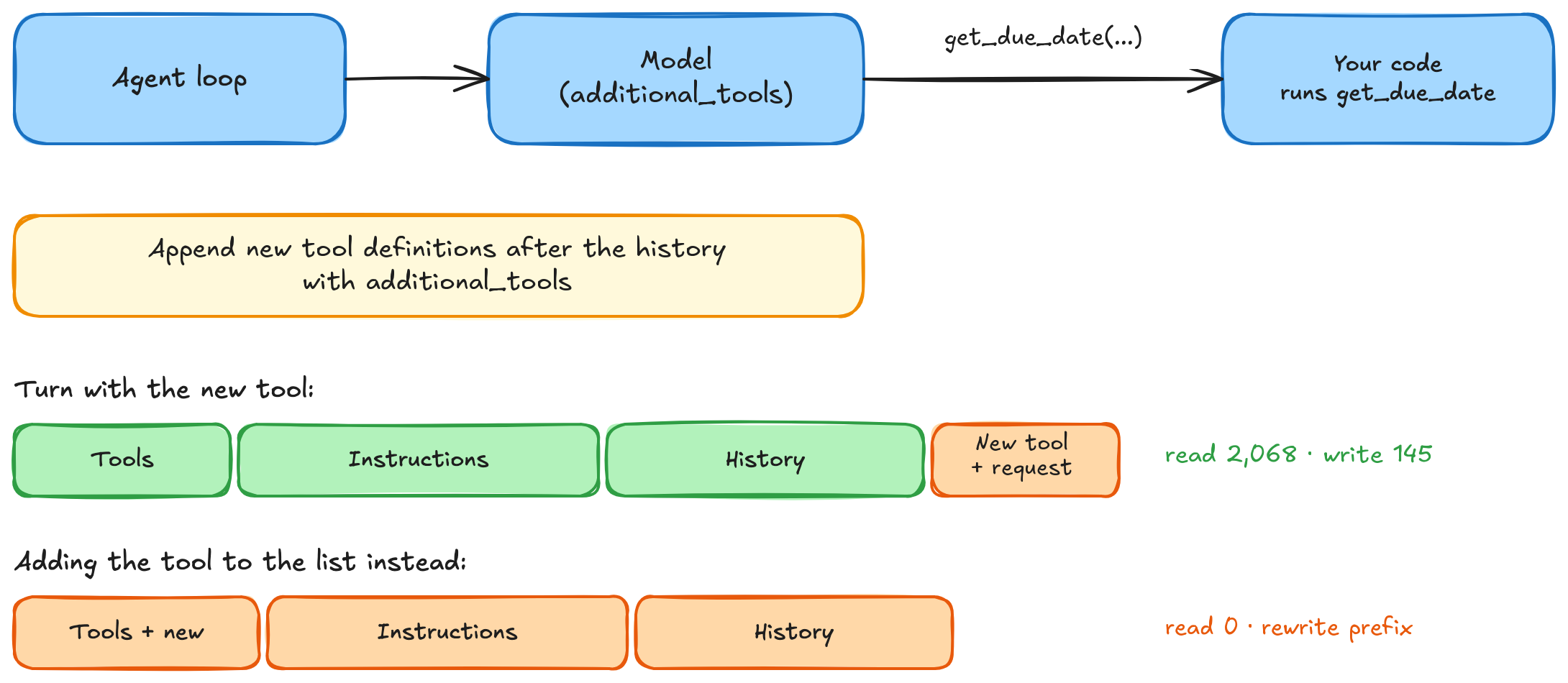
Figure 5: Appending a tool keeps the earlier prefix reusable, with example counts from GPT-6 Astra on Amazon Bedrock Runtime
Continue the tool-execution loop with the new response. The loop adds the model’s output to history, runs any requested tools, and appends their results. Keep the additional_tools item in later requests so the new tool remains available. In implicit mode, Amazon Bedrock can cache through the new user message, including the tool definitions that precede it. In explicit-only mode, retain earlier breakpoints and add one to an input_text block in that user message. The additional_tools item itself can’t hold a breakpoint.
Different roles, different catalogs. When different agent roles need different tools, choose a stable tool profile, such as support or billing, at the start of each session. Each profile gets its own cached prefix. Mark the shared instructions so later tasks with that profile can reuse them, then use either mode as the conversation grows.
Cached tool profiles
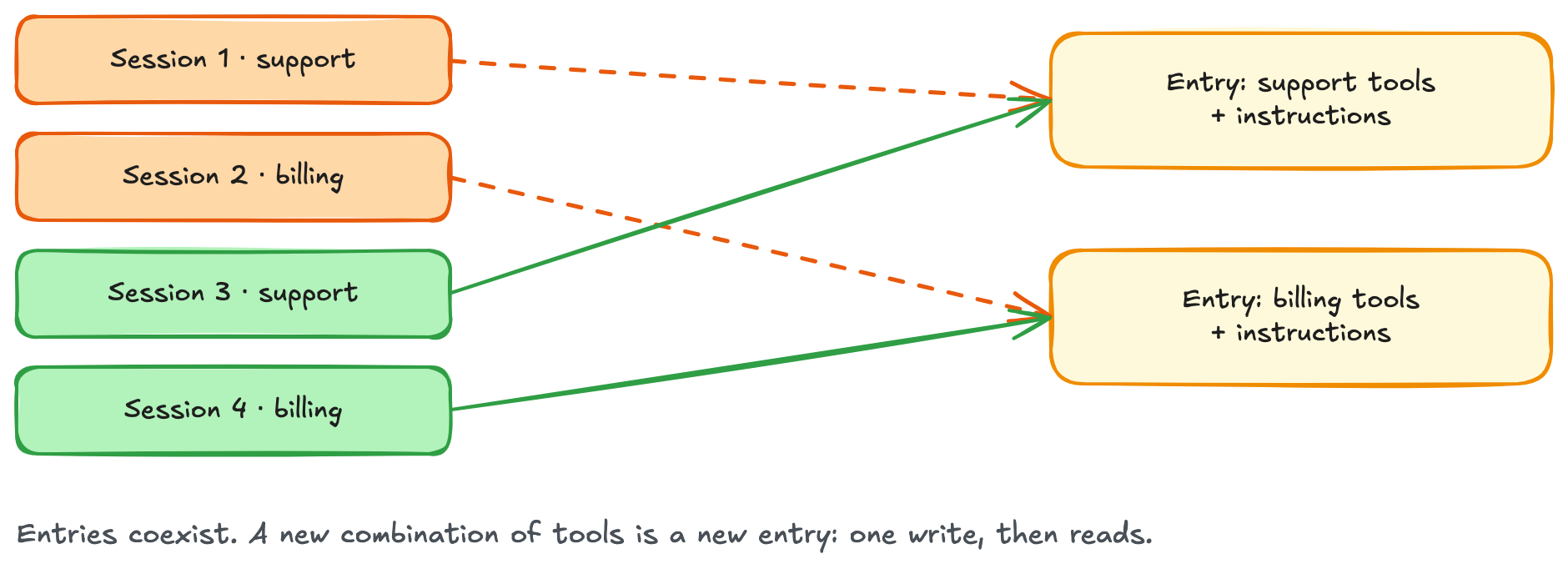
Figure 6: Each tool profile has its own cached prefix, reusable by matching sessions
Subagents and side calls
Delegating shouldn’t make every helper reread the same background. Share the prefix, then add each helper’s task at the end. Be aware that when you use caching with AI agents, tools and system prompts can be leaked or exploited. Establish responsible AI practices that include your prompt caching implementation as part of that governance.
Warm once, then fan out. Send an ordinary request first and wait for it to finish before launching helpers. Mark the shared context explicitly in every request, even when the mode is implicit:
shared = {"role": "developer", "content": [{
    "type": "input_text", "text": INSTRUCTIONS,
    "prompt_cache_breakpoint": {"mode": "explicit"},
}]}
warm = client.responses.create(
    model="us.openai.gpt-6-astra", store=False,
    tools=TOOLS, prompt_cache_key=KEY,
    prompt_cache_options={"mode": "implicit", "ttl": "30m"},
    max_output_tokens=16,
    input=[shared, {"role": "user", "content": "Reply READY."}],
)
d = warm.usage.input_tokens_details
if not (d.cache_write_tokens or d.cached_tokens):
    raise RuntimeError("Shared prefix was not cached.")
from concurrent.futures import ThreadPoolExecutor

# helper_tasks contains the task text for each helper.
helper_inputs = [
    [shared, {"role": "user", "content": task}]
    for task in helper_tasks
]
with ThreadPoolExecutor(max_workers=4) as pool:
    helpers = list(pool.map(ask_with_implicit_cache, helper_inputs))
The helpers use the same TOOLS, model, and KEY as the warm-up. A warm-up that ends at the output cap can still populate the cache. The usage check confirms cache activity before the helpers start.
Subagents: Warm the shared prefix once, then fan out
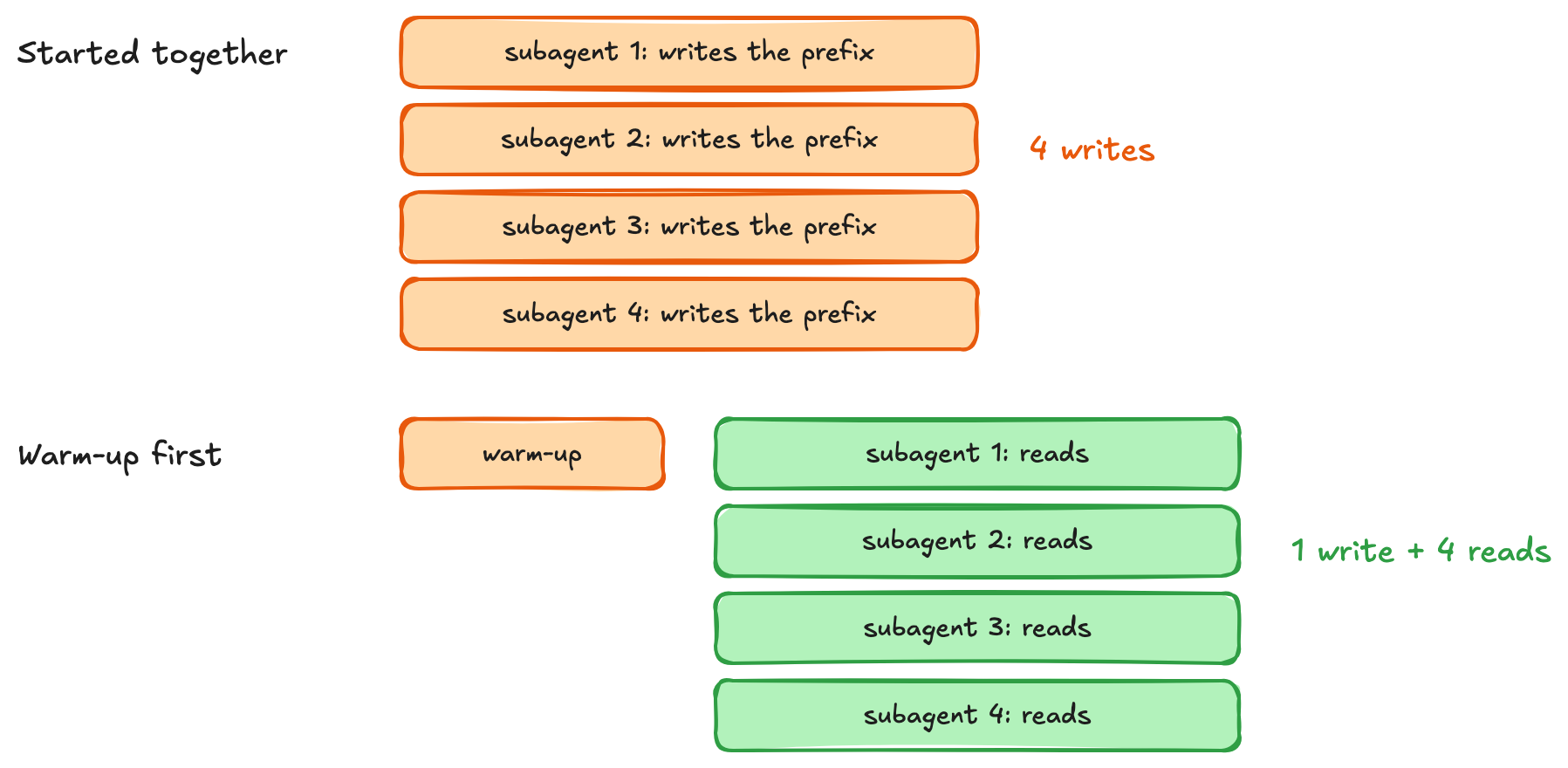
Figure 7: Warm the shared prefix before launching helpers, and each helper then adds its own task
Give side calls the same beginning. The agent loop builds history by appending every resp.output and its matching tool results, including encrypted reasoning. After the parent finishes, copy that complete list for a summarizer or judge. The same helper keeps the tools, model, and key unchanged:
from copy import deepcopy

# history is the completed history built by the agent loop above.
# Copy it so the helper can add instructions without changing the parent.
helper_history = deepcopy(history)
helper_history.append({
    "role": "developer",
    "content": "Summarize this conversation in one sentence. Do not call tools.",
})
summary = ask_with_implicit_cache(helper_history)
d = summary.usage.input_tokens_details
print("history read", d.cached_tokens, "write", d.cache_write_tokens)
print(summary.output_text)

# Example output (assumed values and conversation):
# history read 4096 write 32
# Case C-123 is due on October 31, 2026.
The helper can reuse the cached portion of history, but the appended developer message doesn’t automatically extend the cache to include the summary instruction. If later requests reuse the same history and instruction, place the instruction in an input_text block with prompt_cache_breakpoint. For a one-time summary, no additional marker is needed.
Pauses, restarts, and the cache key
Pauses. Cached prefixes have a minimum 30-minute time to live (TTL), refreshed by successful reuse, and might remain longer. If a session resumes soon, an ordinary warm-up can refresh the prefix before it expires. Compare that request’s cost with letting the cache expire. For the TTL rules, see the Amazon Bedrock documentation.
New sessions. Keep prompt_cache_key stable for requests that are meant to share a prefix. A session-specific key isolates sessions even when their prompts match. In the following example, switching to a shared key let sessions reuse the prefix.
New sessions reuse the cache only if they share the key
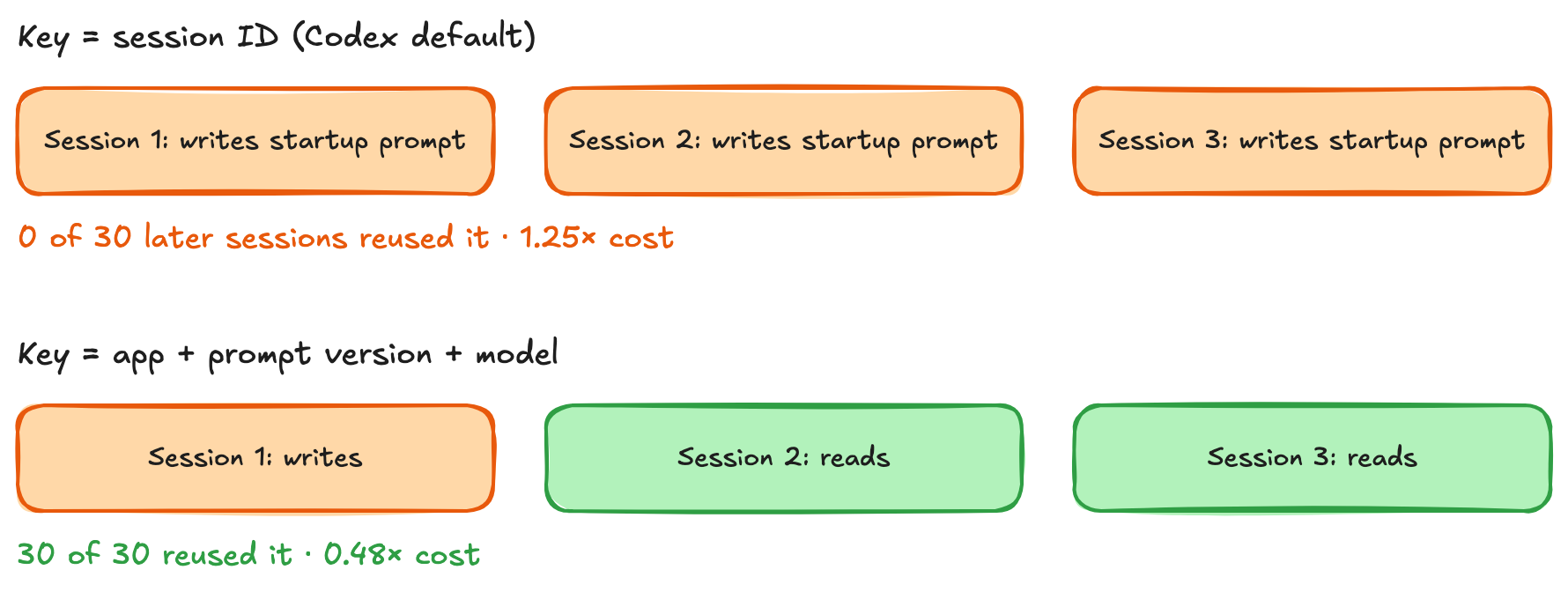
Figure 8: A session-specific key separates cache entries, and a shared key lets matching sessions reuse them
Reuse of existing cache content requires the same model, AWS account, and Region, and an available matching prefix. The following example combines an explicit startup marker with implicit mode. Each session starts with the same instructions and its own task. Both use the same computed key:
import hashlib

def cache_key(app, model, prompt_version, instructions):
    digest = hashlib.sha256(instructions.encode()).hexdigest()[:12]
    return f"{app}:{prompt_version}:{model}:{digest}"

KEY = cache_key("support-agent", "us.openai.gpt-6-astra", "v7", INSTRUCTIONS)
prefix = {"role": "developer", "content": [{
    "type": "input_text", "text": INSTRUCTIONS,
    "prompt_cache_breakpoint": {"mode": "explicit"},
}]}
for label, question in [
    ("session A", "Explain the refund policy without calling tools."),
    ("session B", "Explain the escalation policy without calling tools."),
]:
    # A fresh conversation for each session; the startup prefix matches.
    session_history = [prefix, {"role": "user", "content": question}]
    result = ask_with_implicit_cache(session_history)
    d = result.usage.input_tokens_details
    print(label, "read", d.cached_tokens, "write", d.cache_write_tokens)
On a cold start, session 1 writes the shared prefix. Session 2 can read it even though its task can be different. Each task can also be cached implicitly. Check the usage counters: matching keys and markers make reuse possible, but a cache entry still has to be available.
What prompt caching delivers
Cost. For a GPT-6 Astra powered agent with an 8,000-token startup prefix and six turns adding 2,000 tokens each, one-time static caching reduced cost to $0.50, and rolling breakpoints reduced modeled input cost by 64 percent: from $0.87 to $0.32 per session.
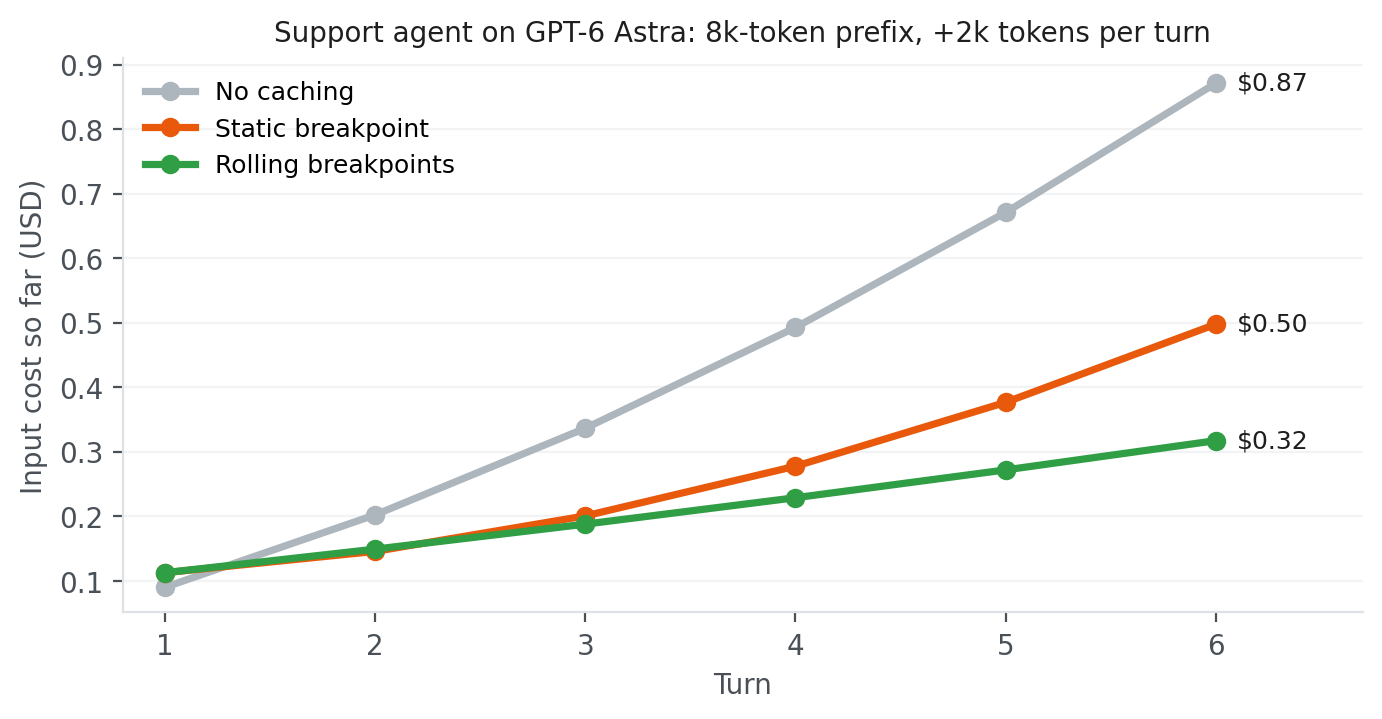
Figure 9: Cumulative input cost per session for the support-agent example, using Amazon Bedrock on-demand prices for GPT-6 Astra
How to tell caching is working
Start with response usage. cached_tokens reports input read from the cache, and cache_write_tokens reports input written to it. As the conversation grows, check that later turns reuse earlier history and that new writes reflect the content being added.
For production monitoring on the Amazon Bedrock Runtime endpoint, use the CacheReadInputTokenCount and CacheWriteInputTokenCount metrics in Amazon CloudWatch. Enable model invocation logging when you need individual request records, then query them with Amazon CloudWatch Logs Insights. For the Amazon Bedrock Mantle endpoint, record the response usage fields in your application logs. Its Amazon CloudWatch namespace currently has no separate cache counters.
To check costs, filter AWS Cost Explorer to Amazon Bedrock and group by Usage type. Cache reads, cache writes, and uncached input appear as separate entries per model. Exclude output-token entries when calculating their shares of input cost.
A short checklist
- Keep the reusable prefix stable. Put shared tools and instructions first, then append conversation history and new turns. Changing a timestamp, message, or tool definition prevents reuse beyond that change. A shorter prefix can still be reused if it has its own saved endpoint.
- Choose boundaries around content you want to reuse. Use implicit caching for growing history, explicit markers for shared prefixes, or both. Explicit-only mode avoids writing disposable suffixes. When extending an explicit-only conversation, retain earlier markers so later requests can find the saved prefixes.
- Keep the initial tool catalog unchanged. Use
allowed_tools to restrict which tools are callable. Append known definitions with additional_tools, or discover them through namespaced client-side tool_search. Choose a stable tool profile when different agent roles need different catalogs.
- Check prefix size and lifetime. A cacheable prefix must contain at least 1,024 tokens. Cached prefixes remain eligible for reuse for at least 30 minutes after their latest write or successful reuse.
- Warm shared content before launching helpers. Mark the shared prefix in both the warm-up and helper requests, including when using implicit mode. Finish the warm-up request before starting parallel calls.
- Keep cache keys stable within each sharing group. Requests intended to reuse a prefix must use the same key. Separate keys can keep cache accounting distinct between customers or users.
- Measure savings across the workflow. Cache writes cost 1.25 times the normal input rate. Read prices depend on the model. Track write costs alongside read savings, using response usage during development and monitoring and billing data in production.
Waking up on February 3rd
Bill Murray only escapes Groundhog Day once he stops repeating the same mistakes and starts carrying what he learned from one day to the next. Agents get there in a similar, if less romantic, way: by keeping the start of their prompt byte-for-byte stable and using automatic or explicit cache boundaries as the history grows.
In this post, we covered how to cache shared tools and instructions, grow the cache across agent turns, and preserve reuse when adding tools, launching helpers, or starting new sessions. Keep the shared prefix stable and append new information as the workflow progresses. Use implicit caching for growing conversations and explicit breakpoints for shared content. Combine them when you need both, or choose explicit-only mode when a changing suffix is unlikely to be reused. Compare cache reads, writes, total input cost, and latency to find what works best for your agent. To apply these patterns, follow the Amazon Bedrock prompt caching documentation for OpenAI models and check model availability by AWS Region and endpoint. Start with one workflow and measure the savings as your conversations grow.
About the author

 Studio