对于大多数 Agent 而言,切换到 V2 就足够了。但有些 Agent 需要重构才能充分利用其优势,而对于聊天和语音体验来说,即使是 2 秒也太慢了。本文解释了 V2 如何启动会话、如何测量会话启动时间,以及如何避免让工作堆积在第一个请求上,包括 AgentCore 运行时现在支持的构建钩子(build hooks)。我们涵盖了四种模式,从修改 Agent 的代码到在用户需要之前预启动会话。
AgentCore 运行时在每个新微虚拟机中运行一个会话。在 V1 版本中,AgentCore 会从 Amazon Elastic Container Registry (Amazon ECR) 拉取您的容器镜像,启动容器,并在处理第一个请求之前运行您的初始化代码。镜像拉取是主要耗时环节,因此冷启动时间随镜像大小增长。
当新会话到来时,AgentCore 将快照恢复到新的微虚拟机中。您的进程从被冻结的位置继续运行,其导入模块、对象和客户端均已就位。来自您镜像的文件采用懒加载方式:会话首次读取某个块时才会从存储中获取该块。
如果您熟悉 AWS Lambda SnapStart,这看起来很熟悉。Marc Brooker 关于 SnapStart 如何加载快照的文章以及 SnapStart 预热策略文章是很好的背景资料。
表中的所有假设都基于您的 Agent 能够将其所需内容保留在自己的进程中。但这并不总是可行的。作为单独进程运行并退出的 CLI,或者浏览器二进制文件,在 init 期间被读取然后消失,因此恢复后的会话会再次从镜像中获取它们。对于这些情况,您可以添加构建钩子,详见“使用钩子”部分。图 3 显示了它的运行位置。
智能体应用程序中的延迟不是一个单一数值。请求花费时间在 AgentCore 运行时中将会话准备好以运行您的代码,然后在您的代码中花费时间:模型调用、工具调用、子 Agent 以及流式传输响应回传。解决这些问题需要不同的方法,因此首先要找出哪个环节占主导。
由于在 V2 上 init 仅在构建快照时运行一次,而不是在每个会话中运行,因此 init 不会出现在这些指标中。它增加了达到 READY 状态的创建或更新时间,而不增加请求延迟。要查看其耗时,请在 app.run() 之前记录一次日志。该行会出现在您运行时的构建日志中:
若要包含来自客户端的网络时间,请在客户端也进行测量。计时 invoke 调用,让处理器返回其运行时长,然后相减。两个时间戳来自同一台机器,因此客户端与微虚拟机之间的时钟差异无关紧要。如果您使用流式传输,非常小的事件可能会被推迟,直到积累了几百字节的输出,因此首个事件的时间可能高于会话启动时间。
查看原文
Agents today review code, process claims, and run unattended for hours. Many also sit behind interactive experiences where a person waits for the first response. Amazon Bedrock AgentCore runtime gives these agents a fully managed, serverless environment: each session runs in its own isolated microVM, the platform scales to zero when there’s no work, and you only pay for the resources your sessions consume.
AgentCore runtime with platformVersion set to “V2” changes how sessions start. Instead of initializing your container for every session, it prepares your environment once, snapshots it, and restores that snapshot for each new session. Session start times are faster and more consistent. V2 also reclaims memory your sessions don’t use, so your bill tracks what your agent uses.
For most agents, switching to V2 is all it takes. Some agents need restructuring to get the full benefit, and for chat and voice experiences even 2 seconds is too slow. This post explains how V2 starts a session, how to measure session start time, and how to keep work off the first request, including build hooks, which AgentCore runtime now supports. We cover four patterns, from changes to your agent’s code to starting sessions before users need them.
Which pattern do you need?
Your situation
What to do
Section
A new session in about 2 seconds is fine
Switch to V2 and do all initialization before app.run()
Keep work off the first request
Your agent needs large files, a CLI, or a browser early, and can’t hold them in its process
Add a build hook to load and prime them while the snapshot is built
Working with hooks
You need sub-second, and users engage before they send their first request (opening the app or a chat window)
Start the session in the background when the user engages
Pre-warm on user engagement
How V2 starts a session
AgentCore runtime runs each session in a new microVM. On V1, AgentCore pulls your container image from Amazon Elastic Container Registry (Amazon ECR), starts the container, and runs your initialization code before it can process the first request. The image pull dominates, so cold start grows with image size.
V2 does that work once. When you create or update a runtime, AgentCore runtime starts your container in a fresh microVM and waits for the first healthy ping (GET /ping), which must arrive within 120 seconds. It then clears the operating system’s file cache, to keep the snapshot small, freezes the microVM, and stores its memory and disk as a snapshot.
This is a change from V1: Every create or update now takes a few minutes while the snapshot is built.
In this post, init means everything your agent does before /ping reports healthy. With the AgentCore Python SDK, that’s everything before app.run(). If you run your own HTTP server, in Node.js or another language, report healthy only after your initialization finishes.
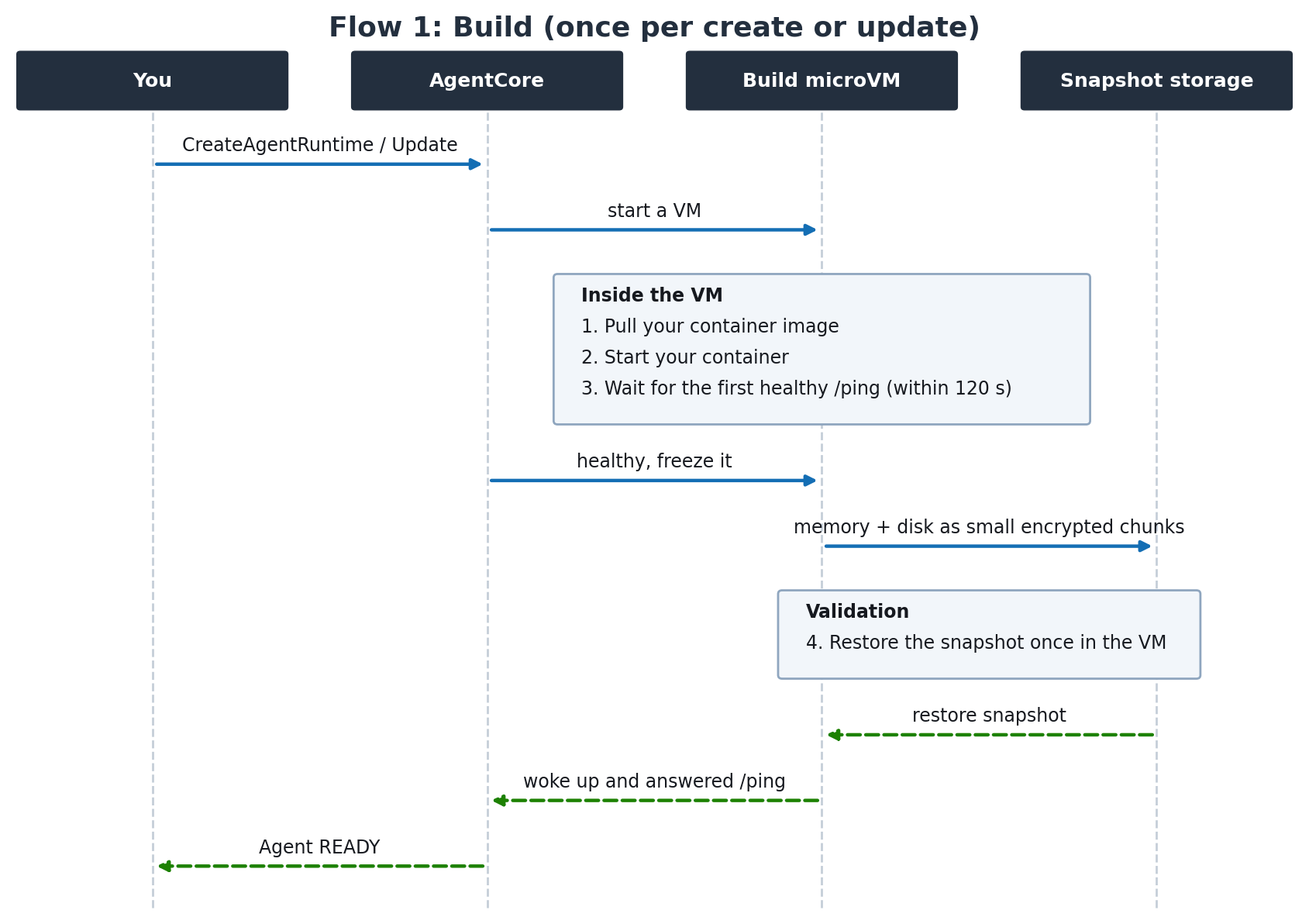
Figure 1: Build, once per create or update
When a new session arrives, AgentCore restores the snapshot into a new microVM. Your process resumes exactly where it was frozen, with its imports, objects, and clients in place. Files from your image are loaded lazily: each block is fetched the first time a session reads it.
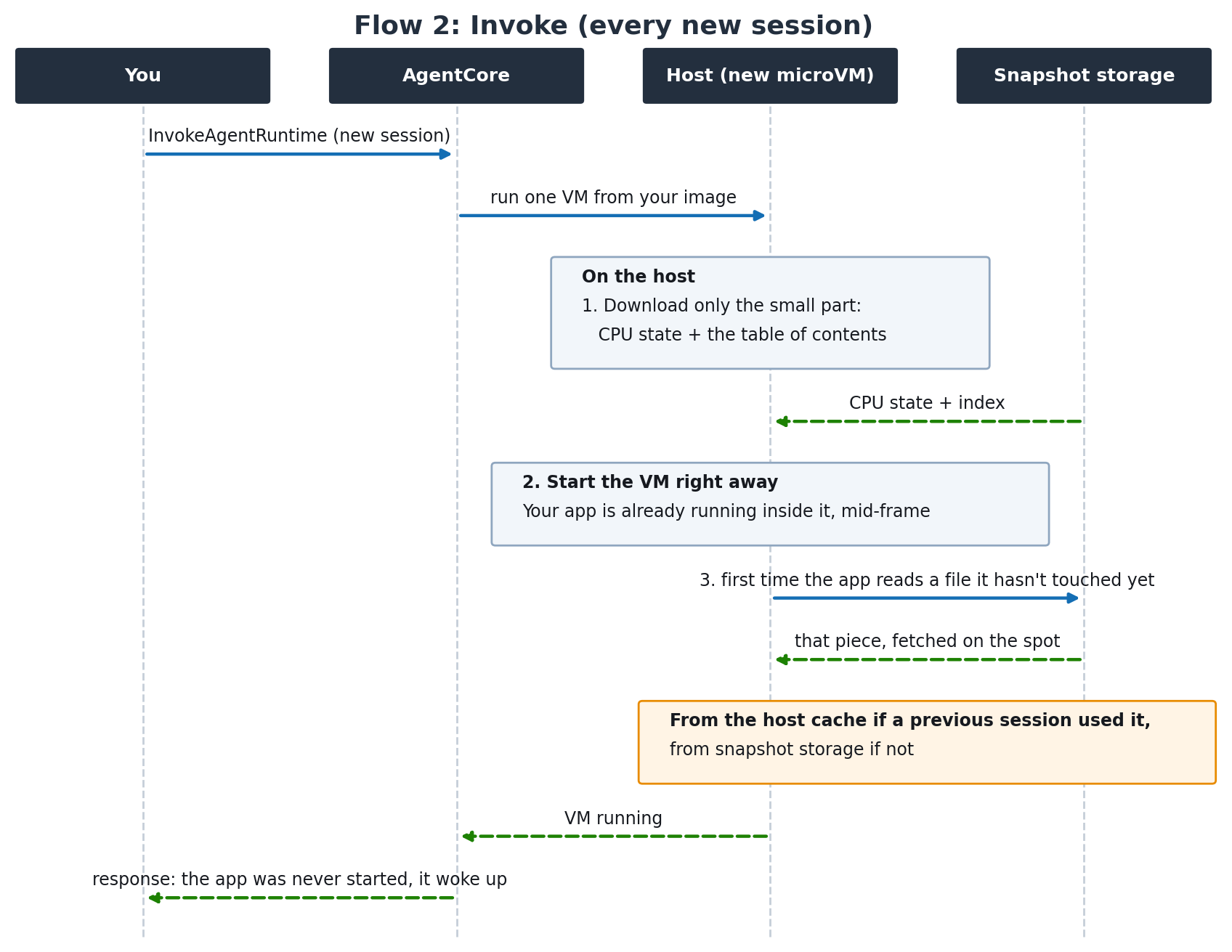
Figure 2: Invoke, every new session
Three facts follow from these flows, and the rest of this post builds on them:
- Memory comes back whole. Anything your process held at snapshot time, and anything in a RAM-backed file system such as
/dev/shm, is available at memory speed from the first access.
- File reads don’t carry over. The file cache is cleared before the freeze, so reading a file during init doesn’t make it fast in a restored session.
- Image files are fetched on first read. The first read of a block comes from snapshot storage and is then cached closer to the host.
The following table shows what that means for the work a typical agent does, depending on where it does it:
Work
Done during init
Done in the handler
Import libraries
In memory when the session starts
Read from the image in every new session
Create clients (for example, boto3)
Restored with endpoint and credential resolution done. Sockets reconnect on first use
Built from scratch in every new session
Open network connections
Stale after the restore. Close them before the snapshot
Opened fresh
Load static data from the image and keep it in an object
In memory when the session starts
Read from the image in every new session
Read a file from the image without keeping the data
No effect, because the file cache is cleared
Read from the image in every new session
If you know AWS Lambda SnapStart, this will feel familiar. Marc Brooker’s post on how SnapStart loads snapshots and the SnapStart priming strategies post are useful background.
Everything in the table assumes your agent can keep what it needs in its own process. That isn’t always possible. A CLI that runs as a separate process and exits, or a browser binary, is read during init and then gone, so a restored session fetches it from the image again. For these cases, you can add a build hook, covered in “Working with hooks.” Figure 3 shows where it runs.
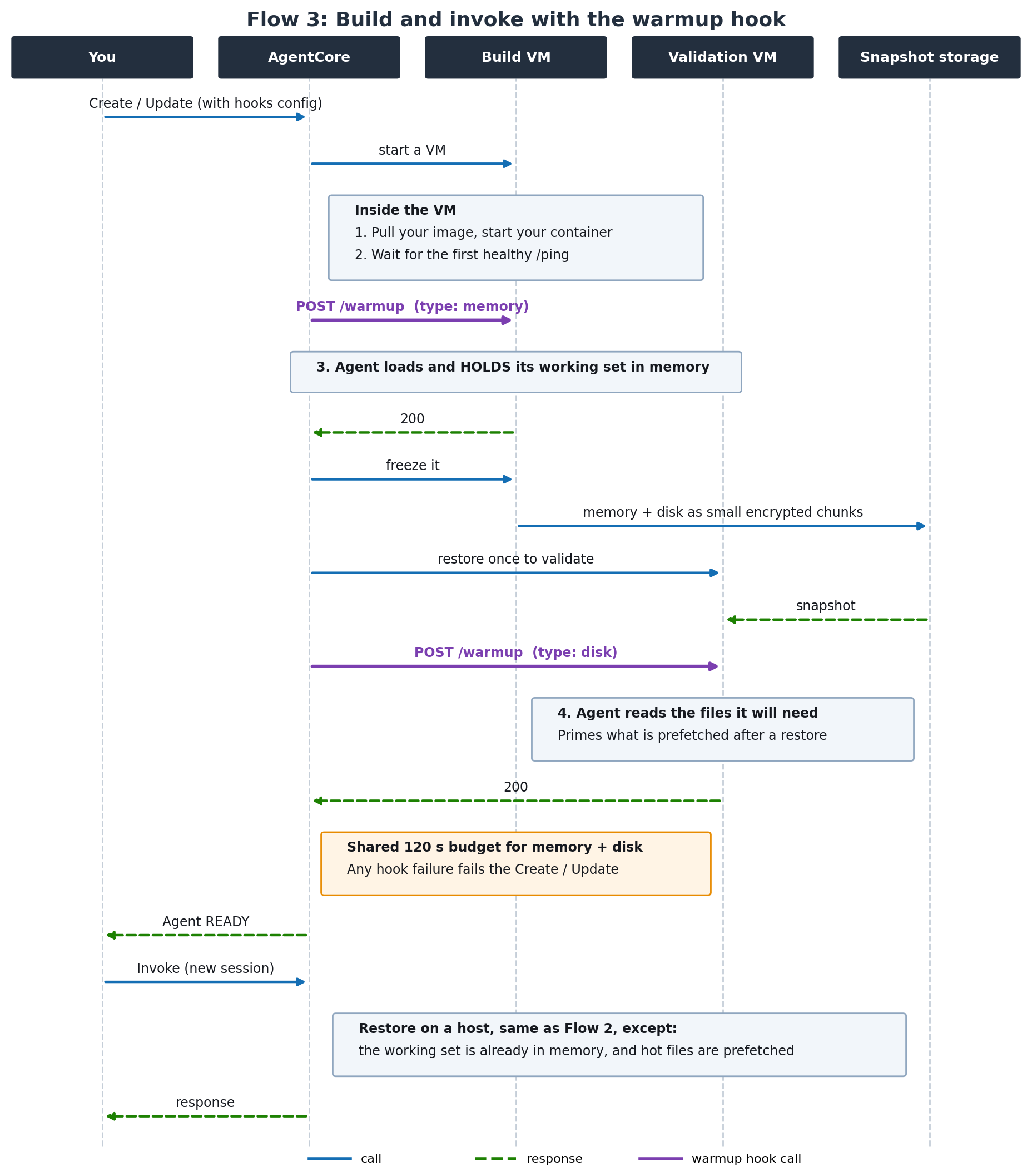
Figure 3: Build and invoke with hooks
Measure before you optimize
Latency in an agentic application isn’t one number. A request spends time in AgentCore runtime getting a session ready to run your code, then in your code: model calls, tool calls, sub-agents, and streaming the response back. You fix these in different ways, so start by finding out which one dominates.
AgentCore runtime publishes both as Amazon CloudWatch metrics in the AWS/Bedrock-AgentCore namespace. Latency is the time to first byte. OverheadLatency is the part that belongs to the platform, such as starting the microVM and restoring the snapshot on a new session.
What you want
How to get it
TTFB (Time to first byte)
Latency
Runtime time
OverheadLatency
Your code’s time
Latency − OverheadLatency
Init time
Measured in your code at startup (see the following example). It isn’t part of any request on V2
Init doesn’t appear in these metrics because on V2 it runs once, while the snapshot is built, and not in each session. It adds to how long a create or update takes to reach READY, not to request latency. To see how long it takes, log it once before app.run(). The line appears in your runtime’s build logs:
import time
INIT_START = time.time()  # first line of your module
# imports, clients, data loading ...
print(f"init_ms={round((time.time() - INIT_START) * 1000)}")
app.run()
How to read the split:
- High
OverheadLatency on new sessions: the time is in session start. Use the patterns later in this post to start sessions before users need them.
- Your code’s time is much higher on the first request than on the second in the same session: work that belongs in init is running in your handler. Add custom spans in AgentCore Observability (a capability of Amazon Bedrock AgentCore) around tool setup, file loads, and late imports to find it, then move it into init.
Report percentiles such as P90 and P99, or trimmed means such as TM90, which averages the fastest 90% of requests and drops the slowest tail. A plain average hides the slow requests. OverheadLatency covers requests to running sessions as well as new ones, so its distribution depends on how many of your requests start a new session. Compare runs with a similar mix.
Test at the rate of new sessions you expect in production, not with a handful of sessions after a deploy.
To include network time from your client, measure on the client as well. Time the invoke call, have your handler return how long it ran, and subtract. Both timestamps come from the same machine, so clock differences between the client and the microVM don’t matter. If you stream, very small events can be held back until a few hundred bytes of output build up, so time to first event can read higher than session start.
Keep work off the first request
The usual cold start advice is to import lazily and keep initialization small. On V2, do the opposite: init runs once, when the snapshot is built, and work deferred to the handler is paid by every new session. This applies to static work: imports, clients, and data from your image. Dynamic data can’t be snapshotted. The next section covers it.
The agents that notice most are the ones that read large files from their image at request time: weights for a small local model, embeddings, datasets, large libraries, a browser binary for automation, or a CLI toolchain that a coding agent runs as subprocesses. Reading many small files, as compiling a TypeScript project does, has the same effect. An agent that imports a few libraries and calls a hosted model mostly needs to get its imports and clients right.
How to restructure your agent
Create objects during init, not only imports. Creating an object loads the modules it depends on and keeps them in active memory. Initialize local tools that use external libraries during init too, not when the agent first calls them.
Create your clients during init. Endpoint resolution, credential resolution, and the client’s modules all come back with the snapshot. Sockets don’t, but boto3 clients reconnect cleanly on the first call. Some other network clients first try the stale socket, which adds hundreds of milliseconds, so close their connections before the snapshot.
Keep static data in memory, such as prompts, skill front matter, configuration, and small indexes. Hold the data in an object, not only a read of it:
INDEX = pathlib.Path("/opt/data/index.bin").read_bytes() # during init: keep the bytes
Keep tools running instead of starting them per request. A subprocess launched in the handler reads its binary and libraries from the image in every new session. A long-running helper started during init, such as a language server or a worker process with its imports done, comes back as part of process memory. Talk to it over a pipe or socket.
Copy files you can’t hold in memory to a RAM-backed disk. Toolchains like tsc run as separate programs that read their own files. Copy them to /dev/shm or a ramfs mount during init so their reads come from memory.
Ship compiled bytecode. uv pip install doesn’t compile by default, so late imports also compile from source. Set UV_COMPILE_BYTECODE=1 or use pip install --compile.
The example below builds the agent, its model, and its clients during init, so every session inherits them:
import json, pathlib
import boto3
import pandas as pd  # import during init, including rarely used libraries
from strands import Agent
from strands.models import BedrockModel
from bedrock_agentcore.runtime import BedrockAgentCoreApp

MODEL_ID = "us.anthropic.claude-haiku-5-5"

# Init: runs once, before the snapshot. Every new session inherits these objects.
PROMPTS = json.loads(pathlib.Path("prompts.json").read_text())
ddb = boto3.client("dynamodb")
agent = Agent(model=BedrockModel(model_id=MODEL_ID), system_prompt=PROMPTS["system"])

app = BedrockAgentCoreApp()

@app.entrypoint
def invoke(payload):
    return agent(payload["prompt"])

app.run()  # /ping answers only after this line
The trade-off: time to first byte on a new session is the time to start the microVM and restore the snapshot, plus the time your handler takes. Moving work into init shortens the handler, but anything you hold in memory makes the snapshot larger. You also pay for that held memory in every session. Measure end-to-end session start before and after the change, so you know you’ve reduced latency and not only moved it from the handler to the restore.
Reference card
Data
Approach
Large files the first request needs, such as a model, a CLI, or a browser
Hold them in memory during init, or prime them with a build hook
Large reference data read selectively
Mount Amazon S3 Files or Amazon Elastic File System (Amazon EFS) during init, through an access point (requires virtual private cloud (VPC) mode)
Files the agent rarely reads
Leave them on the image, or move them to Amazon Simple Storage Service (Amazon S3), S3 Files, or Amazon EFS
Files the session creates
No change needed
Working with hooks
A build hook builds on init and doesn’t replace it. Do what you can in init and use the hook for what init can’t cover. You expose an HTTP endpoint in your container, and AgentCore runtime sends it a POST request twice while it builds your runtime:
- Before the snapshot. On the build microVM, after your agent reports healthy and before the freeze. Anything your agent loads here and keeps in memory is part of the snapshot, so every session starts with it.
- After a test restore. On a separate microVM that restores the snapshot to check it. Nothing from this call is snapshotted. Use it to read the files your sessions will need, which shapes what restored sessions fetch first.
The X-Amzn-Bedrock-AgentCore-Runtime-Warmup-Type header tells your agent which call it’s handling: memory for the first, disk for the second. The two calls share 120 seconds, so the disk call gets whatever time the memory call leaves. Return a 2xx response only after the work is done. Any other response, a failed connection, or running out of time fails the create or update, and AgentCore runtime doesn’t retry. The build-logs- streams in your runtime’s log group show which call failed and why.
Hooks are available on V2 runtimes. Configure them with hooksConfiguration when you create or update the runtime:
client = boto3.client("bedrock-agentcore-control")
client.create_agent_runtime(
    agentRuntimeName="my_agent",
    agentRuntimeArtifact={"containerConfiguration": {"containerUri": IMAGE_URI}},
    roleArn=ROLE_ARN,
    networkConfiguration={"networkMode": "PUBLIC"},
    platformVersion="V2",
    hooksConfiguration={
        "build": {
            "warmup": {
                "action": {"httpPost": {"path": "/warmup", "port": 8080}}
            }
        }
    },
)
The port is optional and defaults to your agent’s serving port. If you set it, use a port from 8000 to 12000 that isn’t reserved by the platform. The path can’t match a route AgentCore runtime already uses on that port, such as POST /invocations or GET /ping. UpdateAgentRuntime replaces the whole hook configuration, so include hooksConfiguration in every update where you want to keep the hook.
In the agent, handle both call types on the same endpoint:
import asyncio
from fastapi import FastAPI, Request, Response

app = FastAPI()

# Files that each session reads when it starts.
STARTUP_FILES = ["/app/models/tokenizer.json", "/app/config/agent.json"]

def load_shared_state():
    # Load what every session needs into memory, such as heavy imports,
    # model weights, and caches.
    ...

def read_startup_files():
    # Read the files that a session reads when it starts, so that new
    # sessions can use them faster.
    for path in STARTUP_FILES:
        with open(path, "rb") as f:
            while f.read(1024 * 1024):
                pass

@app.get("/ping")
def ping():
    return {"status": "Healthy"}

@app.post("/warmup")
async def warmup(request: Request):
    # Header lookup in Starlette and FastAPI is case-insensitive.
    warmup_type = request.headers.get(
        "X-Amzn-Bedrock-AgentCore-Runtime-Warmup-Type", ""
    ).lower()
    # Run the work in a worker thread so that /ping keeps answering.
    if warmup_type == "memory":
        await asyncio.to_thread(load_shared_state)
    elif warmup_type == "disk":
        await asyncio.to_thread(read_startup_files)
    # Respond only after the work is done.
    return Response(status_code=200)

@app.post("/invocations")
async def invoke(request: Request):
    payload = await request.json()
    # Per-request work runs here on every session.
    return {"response": payload.get("prompt", "")}
For the full configuration reference, see Configure lifecycle hooks for AgentCore runtime. For a complete code example, see the sample code.
Snapshot pitfalls: What must stay in the handler
Everything created during init is frozen into the snapshot until your next deploy, and every session starts with the same copy. For most objects that’s the point. For the values below, it’s a bug, and for random values, a security issue.
Load dynamic data in the handler, once per session. Tool catalogs from AgentCore Gateway (a capability of Amazon Bedrock AgentCore), feature flags, and price lists change after you deploy. Load them in the handler and cache them at module level, so each session fetches them once. Sessions can last up to 8 hours, so give the cache an expiry:
_tools, _loaded_at = None, 0.0

def get_tools():
    global _tools, _loaded_at
    if _tools is None or time.time() - _loaded_at > 300:  # wall clock: refresh after 5 minutes
        _tools, _loaded_at = load_gateway_tools(), time.time()
    return _tools
Call get_tools() from the handler and pass the result to the agent you created during init.
Create per-session values in the handler.
Value
Where to create it
Why
Random values, nonces, secrets, keys
In the handler, with secrets, os.urandom(), or uuid.uuid4()
Library random state (Python’s random, NumPy) created during init is identical in every session. Values from the operating system are unique
Current and elapsed time
In the handler, with time.time()
An init timestamp is fixed at snapshot time, and time.monotonic() doesn’t count the time the snapshot spent stored
Timers, rate limiters, TTL caches
Use wall-clock time, or reset them on the first request
Anything measuring elapsed time with a monotonic clock sees almost no gap across the restore
Credentials and tokens you fetch yourself
Refresh them when they expire
Values loaded during init can expire before a session starts
Know the limits. A session ends when its idle timeout expires (idleRuntimeSessionTimeout: 15 minutes by default, from 60 seconds up to 8 hours), when it reaches its maximum lifetime (maxLifetime: 8 hours by default and at most), or when you stop it.
Sub-second: Start the session before the user needs it
Suppose your new session takes about 2 seconds to start, including all the timing breakdown covered in the preceding sections. A session that’s already running answers in about 200 ms. For a chat or voice experience, the way to sub-second is to make sure the session has started before the user’s first request arrives. There are two ways to do that.
Pre-warm on user engagement
Most interactive applications get a signal before the first prompt: the user opens the app, a chat window, or a support page. Use it. Generate a session ID, send the agent a warm-up request in the background, and keep the session ID with the conversation. By the time the user has typed their first message, the session is running.
# Backend, when the user opens the chat (don't block the UI on it)
session_id = f"chat-{uuid.uuid4().hex}"  # session IDs need at least 33 characters
agentcore.invoke_agent_runtime(agentRuntimeArn=ARN, runtimeSessionId=session_id,
                               payload=json.dumps({"action": "prime"}).encode())
save_conversation(user_id, session_id)  # every later turn reuses this session ID

# Agent handler: answer the warm-up before any model call
@app.entrypoint
def invoke(payload):
    if payload.get("action") == "prime":
        return {"primed": True}
    return agent(payload["prompt"])
This pattern needs no extra infrastructure and fully hides session start whenever users take more than about 2 seconds to send their first message. It costs a session for each user who engages but never sends a prompt. A short idle timeout keeps that small.
Conclusion
On V2, AgentCore runtime moves most of the work of starting a session to deployment time. Your container starts once, and every new session restores the result: memory comes back whole, and files are fetched on first read.
To keep session startup time near 2 seconds, do your static work during init, hold the data the first request needs in memory, and keep dynamic and per-session values in the handler. For files your process can’t hold, add a build hook. To get under a second, start the session before the user needs it: on user engagement when you get a signal.
To get started, set platformVersion to V2 when you create or update a runtime, then review Optimize your agent for AgentCore runtime V2. For questions about your workload, reach out to your AWS account team.
About the author

 Studio